MCP Servers
MCP (Model Context Protocol) servers are client/server software that let LLMs running in Copilot Chat request information from third-party services using REST API calls. MCP servers are the intermediaries between Copilot Chat and some information you might request, for example, info about a Jira ticket or a GitHub pull request.
In the diagram above, the user wants Copilot to create a Jira ticket. Copilot has no access to Jira, however. But, the Jira MCP Server (which you have previously configured) does have access to Jira, so Copilot can ask the Jira MCP Server to create the ticket and return any necessary metadata like the ticket ID.
Which MCP Servers Are Approved For Use At Schwab?
This is Schwab's Official MCP registry.
A temporary test link that returns all server information in JSON format is here: https://mcp-registry.scp2-test-app-bdv.dev.schwab.com/v0/servers
Approved servers that have been added to the registry are listed here:
- Local servers are listed here.
- Remote servers are listed here. Will show a 404 until some servers are approved.
Getting Access To Approved MCP Servers
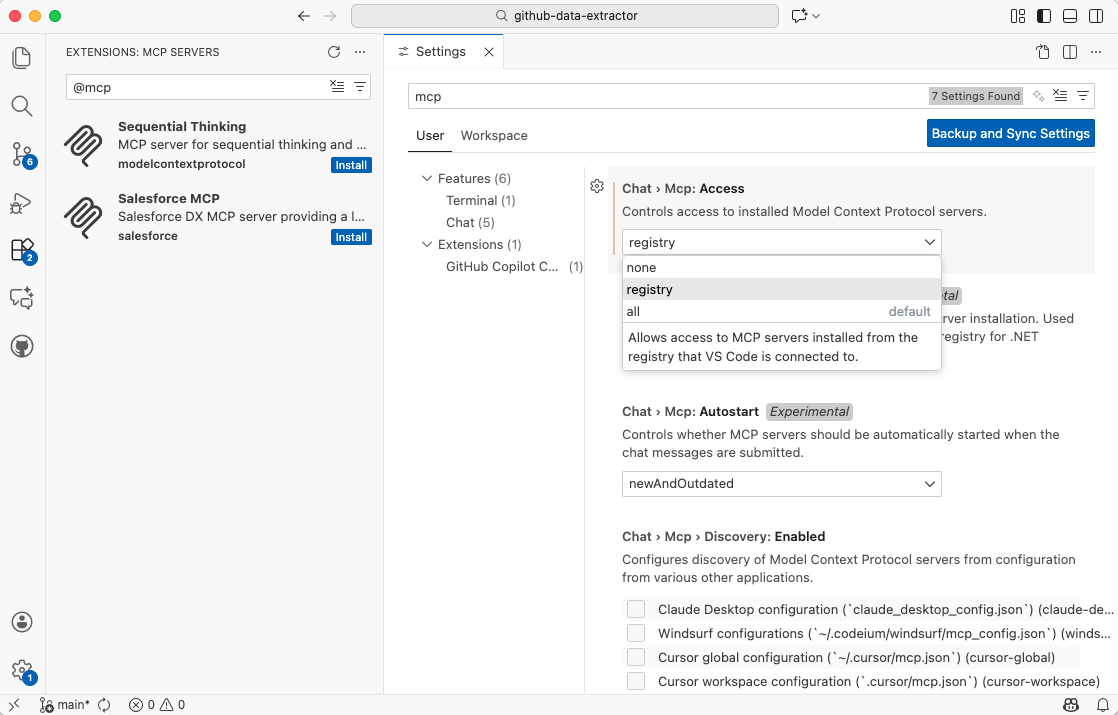
As of the fourth quarter of 2025, Schwab's MCP Server rollout is still in process. By the first quarter of 2026, however, approved MCP servers should start to show up in approved IDEs (VS Code, Visual Studio, JetBrains, Eclipse, Xcode).
For example, in this forthcoming version of VS Code, you should see them in the extensions sidebar if you have the box checked in your settings:
Getting Access To NON-Approved MCP Servers
Getting access to non-approved MCP servers, including ones that you may create at Schwab, requires making the request through your manager and following governance procedures.
The process is outlined in the README.md file in Schwab's official MCP registry here:
An overview of Schwab's MCP Server evaluation criteria and other considerations is here: https://confluence.schwab.com/spaces/ARCHLIB/pages/3178090424/MCP+Server+Architecture+Guidance