Custom Instruction Files
You can add various specialized Markdown files to your repo in order to give LLMs workflow capabilities and context. The files can contain guidelines, workflow instructions, or, really, any kind of background they need to do their job better.
The four types of files you can add to your repo are:
- copilot-instructions.md - a markdown file that always gets included in any prompt you type in Copilot Chat
- AGENTS.md - a markdown file that typically contains guidelines for a specific part of your repo
- prompt files (files are named: [some string].prompt.md) - a markdown file containing reusable prompts. Typically used to define simple workflows.
- custom agent files (files are named: [some string].agents.md) - a markdown file containing reusable prompts plus extra workflow definition. Typically used to define simple to advanced workflows.
In this document, we discuss copilot-instructions.md and AGENTS.md files. The other two files, prompt files and custom agent files are discussed here: prompt files and custom agent files
Chat Context
The more context an AI agent has, the better is it at responding to questions. By default, GitHub Copilot does not remember things you asked it in previous chat sessions and only knows about files that you currently have open in VScode.
As you start to ask it questions and give it commands in your chat session, however, it learns more about what you're doing. This cumulative knowledge helps the LLM improve accuracy and save time.
If you want the LLM to forget everything that you've discussed, you can click the + icon to start a new conversation:
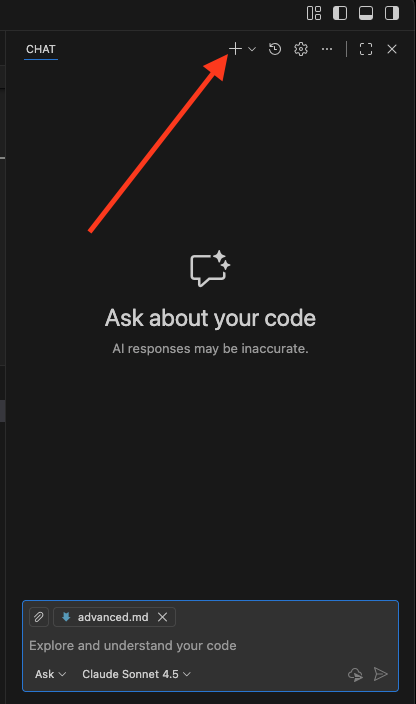
Click the + icon to start a new conversation
The copilot-instructions.md File
To give GitHub Copilot some context about what we have in our NextJS Docker container, we've added a file named copilot-instructions.md file: /home/nextjs-web/.github/copilot-instructions.md. It's a text file in Markdown format that must be located in the .github directory at the root or your repo.
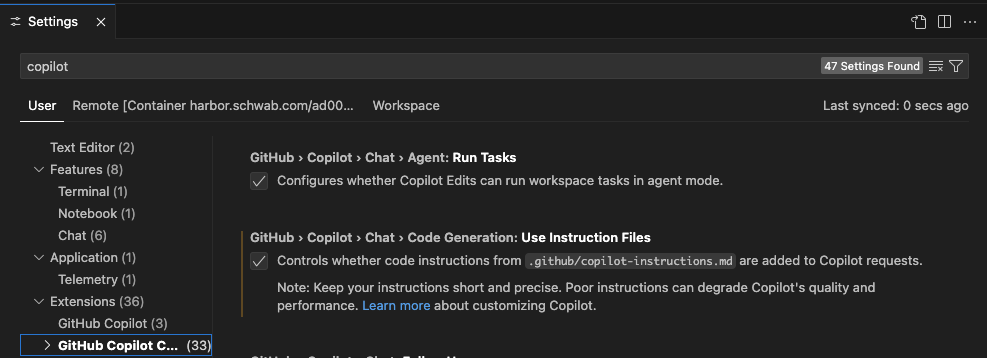
The copilot-instructions.md file is a markdown file that every LLM will include as context by default. The LLM reads the file and uses it as a baseline for answering all queries. In the Next.js container, the file largely contains TypeScript, React, and Next.js coding guidelines.
You can find many examples of copilot-instructions.md files in the awesome-copilot repo.
You can always ask an LLM to create one for you by using a prompt like:
Create a copilot-instructions.md file suitable for a professional Python development team
And then customize it as needed.
The AGENTS.md File
AGENTS.md files are an open format for providing context in a repo. You place AGENTS.md files at the root of your repo, so, it is somewhat redundant to the copilot-instructions.md file mentioned earlier.
However, in a Monorepo like ours, you can add additional AGENTS.md files at the root of each app. The content of each AGENTS.md file should reflect the rules and tasks for that app. So, for example, I have an AGENTS.md file in the Next.js repo at apps/docs/AGENTS.md. If you're working on files in the apps/docs hiearchy, the LLM should automatically use that AGENTS.md file for context.
So far, I've had mixed results using AGENTS.md files. They work sometimes, but sometimes the LLM does not automatically use the AGENTS.md file. Note that you must be in Agent mode (see modes) for the file to be used.
You can find numerous examples of AGENTS.md files on the AGENTS.md page
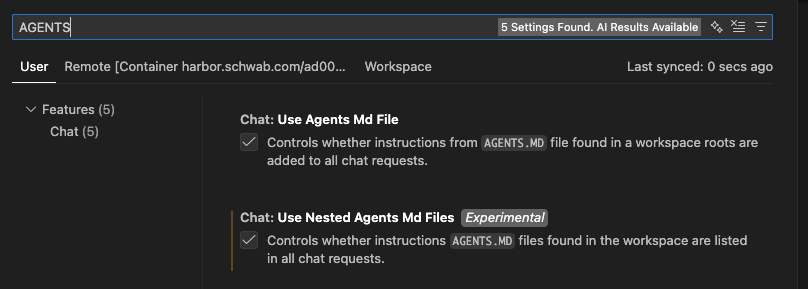
Make sure that you have the Use Agents.md File and Use Nested Agents.md Files settings checked in your settings: