GitHub Copilot Getting Started
You need to signup for GitHub Copilot so that Copilot Chat will appear in your IDE.
Where Does GitHub Copilot Run?
Currently, you must run GitHub Copilot inside of an IDE like VSCode, Visual Studio, PyCharm, or IntelliJ. The installation instructions below assume that you are using VSCode though the sign-up is the same regardless of which IDE you use.
After the internal Copilot Pilot program for Microsoft Office ends, it's assumed that everyone will be able to run Copilot inside of MS Office apps and in web browsers like Edge.
Signing-Up For GitHub Copilot
- You must have access to the Schwab GitHub account.
- Create an access request.
- Go here and click on Assistant in the Pinned section
- Scroll down the page (you must scroll down the page – the button text is not searchable) and look for the Copilot Access button in the Miscellaneous section.
- Click on the Copilot Access button.
- Add any title you want.
- Scroll down and click on the I agree button.
- Click on the green Create button.
- You are now added to the request queue here: https://github.com/charlesschwab/assistant/issues
- Use the search bar to search for your name.
- While you are waiting for access, all you will see is the tag copilot:access
- When you are granted access, you should see the tag copilot:access:complete
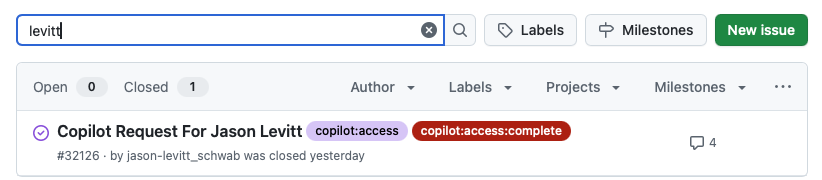
Figure 1: Searching For Your Copilot Access Request
Install The GitHub Copilot Extension In VSCode
Go to the Microsoft landing page for the Copilot extension here, and click on the Install button. Alternatively, you can search for the extension by typing github in the VSCode extensions search bar:
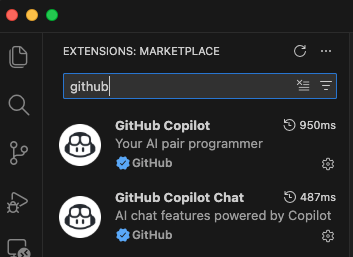
Install the extension with the GitHub logo that is named simply: GitHub Copilot
Installing the GitHub Copilot extension should automatically install the GitHub Copilot Chat extension as well. If your GitHub Copilot Chat window is not open, or you need to manage Copilot, use the dedicated Copilot menu pulldown from the main VScode bar. Select Open Chat to open the Copilot chat window in VS Code so that you can enter prompts.
